


Nightcafe AI Art Review: My Journey as a Nightcafe Creator in Nightcafe Studio
-
- April 21, 2025

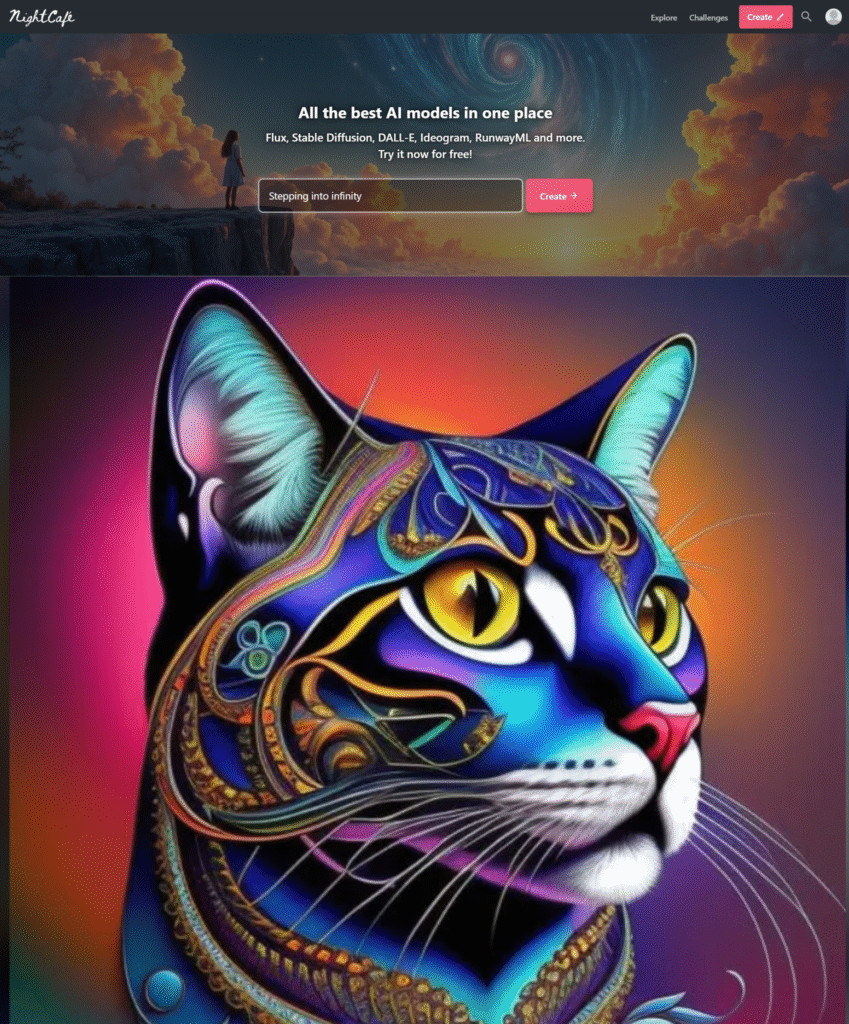
Let me tell you about my journey into the world of AI art. I stumbled upon Nightcafe AI a while back. It changed everything for me. I remember the first time I saw what it could do. Pure magic unfolded on my screen. This wasn’t just a tool. It felt like a creative partner. I want to share my experiences with you. I will dive deep into Nightcafe AI.
Discovering Nightcafe AI
I was looking for new ways to create art. Traditional methods felt limiting sometimes. I saw incredible images online. People said AI made them. My curiosity peaked instantly. I searched for AI art generators. Many options popped up. One name kept appearing. It was Nightcafe. I visited their website. The interface looked clean. It promised easy AI art creation. I was skeptical but intrigued. I decided to give it a try. That was the beginning of my adventure. I stepped into Nightcafe Studio.
Signing up was simple. I used my Google account. It took only seconds. Suddenly, I was inside the platform. It felt a bit like stepping into a digital art studio. This was the start of using the Nightcafe creator. I felt a rush of excitement. What could I make? The possibilities seemed endless. I saw galleries of user creations. They were stunning. People made landscapes, portraits, abstract pieces. The diversity amazed me. I wanted to make something just as cool.
My First Creations with Nightcafe
My very first creation was simple. I used a basic text prompt. I typed something like “a cat sitting on a cloud.” I chose a standard style. I clicked create. The system started working. It used credits for this. I had some free credits to start. Waiting felt exciting. The image slowly appeared. It wasn’t perfect. But it was a cat on a cloud. I was genuinely impressed. AI understood my words. It turned them into a picture.
I tried another prompt. “A futuristic city at sunset.” Again, I chose a simple style. The result was better this time. The colors were vibrant. The details were interesting. I started experimenting more. I tried different prompts. I changed the words slightly. The output changed dramatically. This was fascinating to me. I realized prompting was key. It was like talking to the AI artist. You had to be clear. You had to be creative with your words.
Using Nightcafe AI felt intuitive. The steps were clear. You enter text. You select settings. You generate the art. Anyone could do it. You didn’t need to be a painter. You didn’t need to be a digital artist. You just needed an idea. And Nightcafe AI brought it to life. This accessibility is a huge plus. It lowers the barrier to creation. More people can express themselves visually. That is powerful.
Exploring the Nightcafe Studio Interface
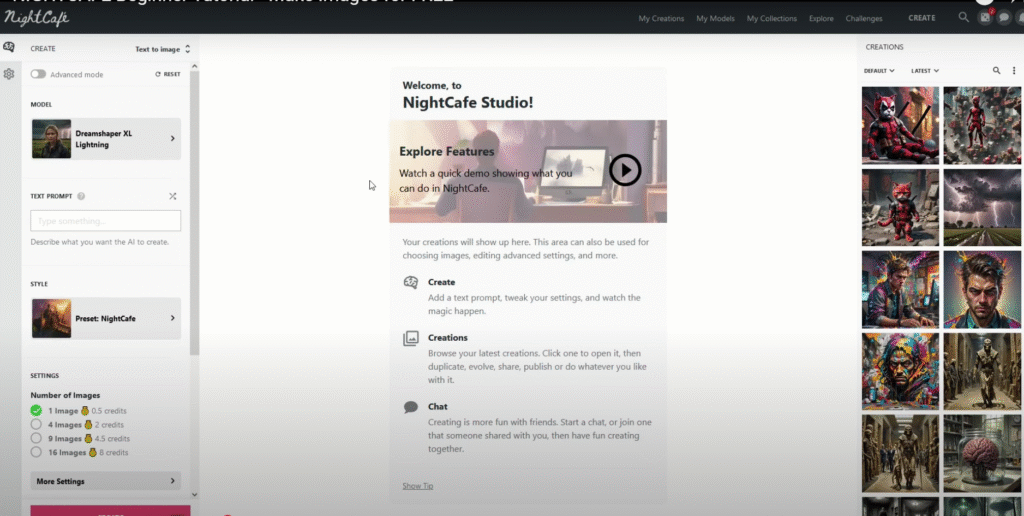
The Nightcafe Studio is well-organized. I found my way around easily. The main page shows your creations. You can see what others are making too. There’s a clear ‘Create’ button. Clicking it takes you to the creation page. This is where the magic happens. You see options for different models. You can input your prompt here. Settings are available too. I spent a lot of time on this page. It became my digital canvas.
The left sidebar has helpful links. You can access your profile. You can see your credits. There are links to the community features. I explored these later. The interface felt responsive. It loaded quickly. This made the creative process smooth. I didn’t get frustrated by slow loading times. That’s important for creativity. You want to stay in the flow. Nightcafe helps you do that.
I found the settings easy to adjust. You can change aspect ratios. You can choose the number of images generated. More images cost more credits. But it gives you more options. You can pick the best one. I liked having this control. It allowed me to fine-tune my results. I wasn’t just a passive observer. I was directing the AI. I was the Nightcafe creator.
Diving into Creation Methods and Models
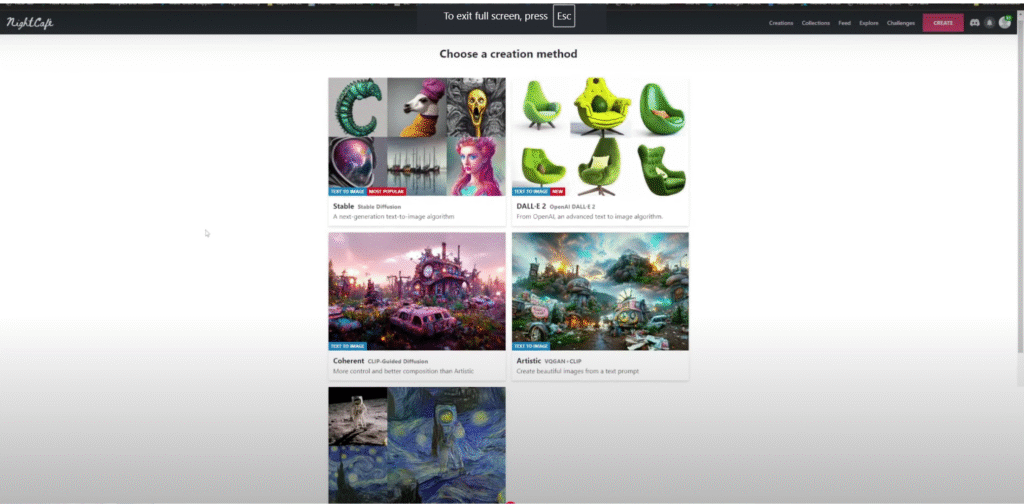
Nightcafe offers several creation methods. They use different AI models. Each model has its strengths. I experimented with all of them. This was crucial for understanding Nightcafe AI art.
One of the older methods is VQ-GAN+CLIP. This was popular early on. It creates artistic, sometimes abstract images. I used it for dreamy scenes. The results were often painterly. They had a unique texture. It was great for expressive pieces. But controlling details could be hard.
Then came Diffusion methods. These felt more advanced. They produced sharper images. They had better coherence. Prompts translated more accurately. I started using Diffusion more often. It felt like a step up. It offered more realism. It was good for landscapes and objects.
Stable Diffusion became a game changer. Nightcafe integrated it quickly. Stable Diffusion models are powerful. They create high-quality images. They are versatile. You can generate many styles. Realistic photos are possible. So are illustrations and concept art. This became my go-to method. It offered the best balance. Quality, speed, and control.
I also played with Neural Style Transfer. This applies the style of one image to another. It’s not generating from scratch. It’s blending existing visuals. I used photos of mine. I applied famous painting styles. The results were interesting. It was a fun side activity. But generating from text is the core appeal for me. That’s the magic of Nightcafe AI art.
Each model requires different prompting styles. I learned this through trial and error. VQ-GAN+CLIP liked descriptive, atmospheric words. Stable Diffusion responded well to specific details. Understanding the model helps you prompt better. It makes you a better Nightcafe creator. I read guides on their site. I learned from other users. This improved my results significantly.
Here is a table comparing some methods I used:
| Creation Method | Style Tendency | Prompting Style | My Common Use Case |
| VQ-GAN+CLIP | Dreamy, Painterly, Abstract | Descriptive, Atmospheric | Expressive, Surreal Art |
| Coherent (Diffusion) | Sharper, Coherent, Artistic | Detailed, Specific Subject | Landscapes, Objects, Characters |
| Stable Diffusion | Versatile, High Quality, Realistic | Detailed, Style-Focused | Anything! My main tool. |
| Neural Style Transfer | Blends source image and style | Requires two images | Applying artistic filters |
Note: Availability and names of methods might change as Nightcafe updates.
This table helped me decide. When I had an idea, I picked the method. If I wanted something abstract, I might use VQ-GAN+CLIP. For a realistic concept, Stable Diffusion was best. This strategic approach improved my Nightcafe AI art.
Mastering the Art of Prompting
Prompting is the heart of AI art. It’s how you communicate with the AI. It’s not just typing words. It’s crafting a description. It’s setting the scene. It’s specifying the style. My early prompts were basic. My results were basic too. I quickly learned prompt engineering. This is a skill in itself. I became obsessed with writing good prompts.
I learned to be specific. Instead of “a forest,” I’d write “an ancient forest, giant trees, dappled sunlight.” Adding details helps the AI. It understands your vision better. I used adjectives and adverbs. I described the mood. I described the lighting. I described the perspective. Every word mattered.
Adding style keywords is important. I learned which words influence the style. “Digital painting,” “photorealistic,” “watercolor,” “concept art.” These terms tell the AI what look you want. I experimented with combining styles. “Digital painting of a futuristic city, cyberpunk style, cinematic lighting.” The results were amazing. The AI blended the concepts. It created something new.
Negative prompts are also useful. You tell the AI what not to include. I used this to fix issues. If images looked blurry, I added “blurry” to the negative prompt. If I didn’t want certain objects, I listed them. This gave me more control. It helped refine the Nightcafe AI art.
I also learned about prompt weighting. You can tell the AI which parts of the prompt are more important. You use special syntax for this. It lets you emphasize certain elements. I used this to make sure key parts of my vision were prominent. Mastering prompting takes practice. I spent hours experimenting. It felt like learning a new language. The language of Nightcafe AI.
I shared my prompts with others. I saw their prompts too. The Nightcafe community is great for this. People share tips and tricks. I learned so much from them. We are all Nightcafe creators together. We learn from each other’s experiments. This collaborative spirit is wonderful.
The Power of Styles and Settings
Nightcafe offers many pre-defined styles. These are like filters or presets. You can apply them easily. They give your art a specific look. There are artistic styles, photographic styles, and more. I tried applying different styles to the same prompt. The results were wildly different. It shows how much style influences the output.
I found some styles worked better than others for certain subjects. A “fantasy art” style was great for mythical creatures. A “cinematic” style worked well for dramatic scenes. I could browse the styles available. I could preview what they looked like. This made choosing easier. I could also adjust the strength of the style. I could blend the prompt’s influence with the style’s influence. This offered even more control.
Beyond styles, there are other settings. You can adjust the ‘chaos’ or ‘diversity’. Higher chaos means more varied results. Lower chaos means more similar results. I used higher chaos when exploring ideas. I used lower chaos when refining a concept. I also controlled the resolution. Higher resolution costs more credits. But the details are sharper. I usually created lower resolution drafts first. Then I upscaled my favorites.
Experimenting with settings is key. It’s not just about the prompt. The settings shape the final image. They are part of the creative process. Becoming familiar with these options is important for any Nightcafe creator. It lets you push the boundaries of Nightcafe AI art.
Engaging with the Nightcafe Community
The Nightcafe community is active and supportive. I found it on their website. There are forums and galleries. Users share their creations. They comment on others’ work. They offer feedback. I loved Browse the galleries. I saw incredible art daily. It was inspiring. It pushed me to try new things.
There are also daily challenges and contests. Users are given a theme or a starting image. They create art based on it. I participated in these often. It was a fun way to get ideas. It pushed me out of my comfort zone. Winning a contest felt great. It gives you recognition. It earns you credits too!
I interacted with other users. I asked questions. I shared my knowledge. We discussed prompting techniques. We talked about new AI models. It felt like a community of artists. We all shared a passion. We all loved creating Nightcafe AI art. The community makes Nightcafe Studio more than just a tool. It’s a place to connect.
I saw users helping each other. Beginners asked for advice. Experienced users offered guidance. It was a positive environment. This supportive atmosphere is valuable. It encourages learning and growth. Being part of this community enhanced my experience with Nightcafe.
Understanding the Credit System
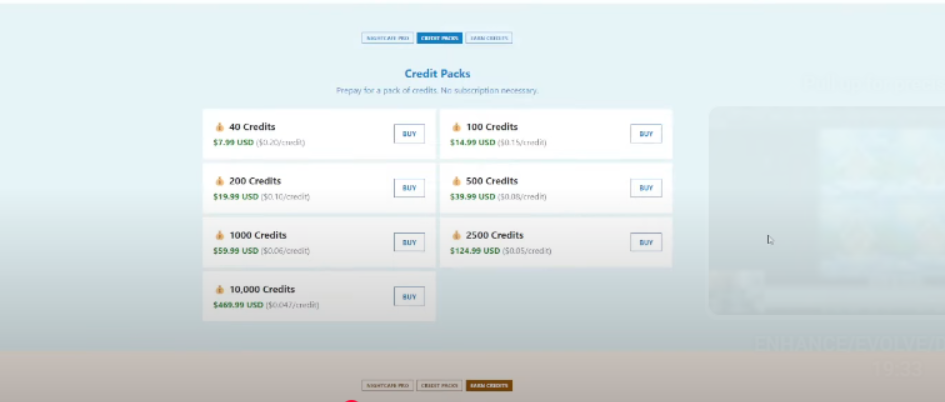
Nightcafe uses a credit system. You need credits to generate art. Different actions cost different amounts. Creating a low-resolution image costs fewer credits. Generating more images costs more. Using certain advanced settings costs more. This is standard for many AI services. They use computing power. Credits pay for that power.
Nightcafe offers ways to get credits. You get some free credits daily. Logging in gives you a few. Participating in the community gives you more. Liking creations, commenting, winning contests. These actions earn credits. This encourages engagement. It rewards active users.
You can also buy credits. They offer different packages. The cost per credit decreases with larger packages. I started with free credits. As I used Nightcafe more, I bought credits. I saw it as an investment. An investment in my creativity. The pricing felt fair. It was comparable to other services. I evaluated my usage. I chose a package that suited me.
I kept an eye on my credit balance. I learned to optimize my spending. I used lower settings for drafts. I only spent credits on high-resolution renders for my best pieces. This helped me manage my resources. Being mindful of credits is part of using Nightcafe. It makes you think about each creation. It gives value to the process.
My Personal Pros and Cons
After using Nightcafe extensively, I have formed opinions. Here are the pros and cons I see, based on my experience as a Nightcafe creator:
| 👍 My Pros (What I Love) | 👎 My Cons (What I Find Challenging) |
|---|---|
| Easy to Use: The interface is intuitive. I learned it quickly. | Credit Consumption: High-resolution images can use many credits quickly. |
| Multiple Models: Access to different AI models is great. It offers variety. | Prompting Learning Curve: Getting exactly what you want takes practice. |
| Versatile: I can create many different styles. Anything from realistic to abstract. | Inconsistent Results (Sometimes): AI can be unpredictable. The same prompt might give different results. |
| Active Community: The community is helpful. I learned so much from others. | Cost: For heavy users, buying credits can add up. |
| Daily Free Credits: This lets me experiment without constant buying. | Server Load: Sometimes generation takes longer during peak times. |
| Mobile App: I can create on the go. This is very convenient. | Can be Addictive: I spend a lot of time creating! |
| Contests and Challenges: These are fun and inspiring. They provide good prompts. | |
| Constant Updates: Nightcafe keeps adding features. They improve the models. | |
| Good for Beginners: It’s a great place to start with AI art. | |
| Authority Building: Using it lets me create my own unique visuals. |
Overall, the pros heavily outweigh the cons for me. My experience with Nightcafe AI has been overwhelmingly positive. The challenges are part of the creative process. Learning to prompt is rewarding. Managing credits makes me think strategically.
Comparing Nightcafe to Other Platforms (Briefly)
I have tried other AI art generators. Midjourney is very powerful. Its results are often stunning. But it is primarily Discord-based. I prefer a web interface. Nightcafe Studio feels more accessible to me. It’s all in one place.
DALL-E 2 was also impressive. It has great image editing features. But Nightcafe’s range of models and community felt stronger. For a dedicated creative platform, Nightcafe stood out.
Some platforms focus on specific styles. Others are very basic. Nightcafe hits a sweet spot. It offers power and flexibility. But it remains user-friendly. For someone like me, who wants a dedicated creative hub, Nightcafe is excellent. It’s where I feel most comfortable creating Nightcafe AI art.
I’m not saying Nightcafe is definitively “better.” It depends on your needs. But based on my personal use and preferences, Nightcafe is my platform of choice. It fits my workflow. It inspires me.
Real-Life Examples and Use Cases
I use Nightcafe AI for various purposes. My main use is creating art for myself. I generate images based on my imagination. Scenes from books I’m reading. Concepts for stories I’m writing. Just random ideas that pop into my head. This is pure creative expression.
I also use it for inspiration. I might generate a series of images based on a theme. Looking at the results sparks new ideas. It helps me visualize concepts. It’s like a visual brainstorming tool. This is invaluable for creative projects.
Sometimes I use it for practical things. I might need an image for a blog post. Or a background for a presentation. Instead of searching stock photos, I create something unique. It’s tailored to my needs. It adds a personal touch. This use of Nightcafe AI art is very practical.
I’ve seen others use Nightcafe for commercial purposes. Creating art for book covers. Generating images for merchandise. Designing concept art for games or films. The potential is huge. The quality of the output is high enough for many professional uses. Nightcafe creator tools are powerful for this.
I shared some of my creations online. On social media. On art platforms. People reacted positively. They were curious about how I made them. I proudly told them about Nightcafe AI. It felt good to share my new skill.
One specific example: I was writing a short fantasy story. I needed a visual of a specific magical forest. I tried describing it in prompts. I used keywords like ” bioluminescent trees,” “misty forest floor,” “ancient ruins.” I experimented with different styles. After several iterations, I got an image. It was exactly how I pictured it. It helped me visualize the scene better. It even inspired new elements in the story. This is a powerful example of AI art aiding traditional creativity.
Another example: I wanted to create a unique profile picture. Something that represented me. I used prompts related to my interests. “Astronaut reading a book in space,” “colorful nebulae,” “cozy atmosphere.” I generated many variations. I found one I loved. It felt personal and creative. I use it everywhere now. It’s a piece of Nightcafe AI art that represents me.
These examples show the versatility. Nightcafe is not just for making pretty pictures. It’s a tool for thinking. A tool for visualizing. A tool for expressing yourself.
My Authority as a Nightcafe User
I’ve spent countless hours on Nightcafe. I’ve created hundreds, maybe thousands, of images. I’ve explored every setting. I’ve experimented with every model. I’ve participated in the community. I’ve learned from trial and error. I’ve invested my time and credits.
I understand how the different models behave. I know which prompts work best for certain outcomes. I can predict, to some extent, what the AI will generate. I can troubleshoot issues. I can help others learn. I’ve seen the platform evolve. I’ve seen new features added. I’ve adapted my workflow.
My experience is not just theoretical. It’s hands-on. It’s practical. I live and breathe Nightcafe AI art creation. When I talk about prompting, it’s from hours of typing words and seeing results. When I talk about credits, it’s from managing my own balance. When I talk about the community, it’s from direct interaction.
I feel confident in sharing my insights. I’ve been through the learning curve. I’ve achieved exciting results. I’ve also faced frustrations and overcome them. This journey gives me a unique perspective. I can speak with authority about using Nightcafe AI. I am a dedicated Nightcafe creator.
Advanced Techniques I’ve Explored
As I became more comfortable, I explored advanced techniques. These pushed my Nightcafe AI art further.
One technique is using initial images. You can upload an image. The AI uses it as a starting point. I used this to maintain consistency. If I wanted a character to look similar in different scenes, I used an initial image. It guided the AI’s creation.
Prompt blending is another technique. You can blend two or more prompts. The AI tries to combine them. I used this for complex concepts. Like “a dragon made of clouds” and “a mechanical city.” The AI generated interesting fusions. It led to unexpected and creative results.
Using seeds is also important. A seed is a number. It influences the initial noise the AI starts with. Using the same seed and prompt gives the same result. This is useful for recreating or iterating on an image. I used seeds to make small adjustments to a creation. I could change one word in the prompt. The rest of the image would stay similar. This allowed for precise iteration.
I also delved into specific model parameters. Some models offer more fine-grained control. Adjusting these parameters can impact the style, coherence, and detail. This requires a deeper understanding of the model. I learned about these parameters through guides and experimentation. It gave me even more power as a Nightcafe creator.
These advanced techniques require more effort. But they unlock greater creative potential. They allow you to move beyond basic prompting. They let you truly sculpt the AI’s output. My journey with Nightcafe AI has been one of continuous learning and exploration.
Dealing with Challenges
It hasn’t always been smooth sailing. I faced challenges using Nightcafe AI. Sometimes the AI misunderstands my prompt. The result is not what I expected. This can be frustrating. I learned to refine my prompts. I tried different wordings. I broke down complex ideas.
Sometimes the results were distorted. Or had weird artifacts. This is common with AI generation. I learned to use negative prompts. I regenerated the image. I adjusted settings. Often, a few tries improved the quality.
Credit management was a learning curve. Initially, I used credits too freely. I ran out quickly. I learned to be more strategic. I used free methods when possible. I only spent credits on high-quality outputs.
Server load could sometimes slow things down. During peak hours, generations took longer. This is understandable. Many people are using the service. I learned to be patient. Or I planned my creative sessions for off-peak times.
Despite these challenges, I didn’t give up. The potential for amazing art kept me going. Each challenge was a learning opportunity. It made me a better Nightcafe creator. I learned to work with the AI, not just command it.
The Future of Nightcafe AI
I am excited about the future of Nightcafe AI. AI technology is advancing rapidly. New models are constantly being developed. Nightcafe has shown they quickly integrate new advancements. I expect to see even more powerful models. Even better image quality. Even more control over the creative process.
I hope to see more features for collaboration. Ways to work on art with others. More advanced editing tools within the platform. Perhaps even tools for animating AI art.
The community is also growing. I anticipate more interaction. More shared knowledge. More inspiring art. The Nightcafe creator community is a vibrant place.
Nightcafe is not just following trends. They are part of shaping the future of AI art. I feel like I am on this journey with them. As they evolve, my ability to create Nightcafe AI art evolves too. It’s a dynamic and exciting field to be in.
My Favorite Nightcafe Creations
I have so many favorite creations. It’s hard to pick just a few. There’s the image of the “cosmic library.” Books floating among stars. The style is painterly and ethereal. It captures a feeling of wonder.
Then there’s the series of ” робот самурай” (robot samurai). I used a sci-fi prompt with a historical twist. The results were detailed and epic. They looked like concept art for a cool video game.
I also love the abstract pieces I created. Using VQ-GAN+CLIP, I generated swirling colors and shapes. They didn’t represent anything specific. But they evoked emotions. They were purely visual experiences.
Each creation holds a memory. The prompt I used. The settings I chose. The feeling I had when it generated. Nightcafe AI art is more than just the final image. It’s the process. It’s the journey of bringing an idea to life.
Sharing these pieces is rewarding. Seeing others appreciate them is a great feeling. It validates the time and effort I put in. It reinforces my passion for being a Nightcafe creator.
Why I Keep Coming Back to Nightcafe
I keep returning to Nightcafe for several reasons. The primary reason is the creative power it gives me. I can visualize anything. I can create anything. My imagination is the only limit.
The user-friendly platform is another reason. It’s easy to use. It’s reliable. It’s a pleasure to spend time in Nightcafe Studio.
The community is also a big draw. Connecting with other artists. Sharing ideas. Getting inspired. It makes the creative process less solitary.
The constant evolution of the platform excites me. There’s always something new to try. New models, new features, new possibilities. I never get bored.
Finally, it’s the joy of discovery. Every time I type a new prompt, I wonder what will appear. It’s like opening a present. There’s a thrill of anticipation. That feeling keeps me coming back. That’s the magic of Nightcafe AI.
Tips for New Nightcafe Users
If you are new to Nightcafe AI, here are my tips:
- Start with the basics. Don’t try complex prompts right away.
- Experiment with different models. See what each one does.
- Use the free credits. Learn the ropes without spending money.
- Explore the styles. See how they change your art.
- Join the community. Look at other users’ prompts. Ask questions.
- Don’t be afraid to experiment. Try weird ideas. You might be surprised.
- Learn about prompting. Read guides. Practice writing descriptive prompts.
- Use negative prompts. Tell the AI what you don’t want.
- Manage your credits wisely. Use lower settings for drafts.
- Have fun! This is a creative tool. Enjoy the process.
Nightcafe AI is a powerful tool. But it’s also accessible. You don’t need technical skills. You just need imagination. Follow these tips. You’ll be creating amazing Nightcafe AI art in no time. You’ll become a Nightcafe creator too.
Conclusion: My Nightcafe AI Journey
My journey with Nightcafe AI has been transformative. It opened up a new world of creative possibilities. I started as a curious beginner. I became a dedicated Nightcafe creator. I learned to communicate with AI. I learned to shape digital visions.
Nightcafe Studio is more than a website. It’s a platform for imagination. It’s a community of artists. It’s a glimpse into the future of creativity. I have created art I never thought possible. I have been inspired by others. I have found a new outlet for my ideas.
If you are interested in AI art, I highly recommend Nightcafe. It’s user-friendly. It’s powerful. It’s constantly improving. Give it a try. See what you can create. Your own Nightcafe AI art journey awaits. I am excited to see what you make. Join the community. Start creating. The world of AI art is waiting for you. And Nightcafe is a fantastic place to begin. It has certainly been that for me. My adventure with the nightcafe continues.